What Is the Best Resume Builder Website for 2026?
Compare the best resume builder website options for 2026, from free and AI help to ATS-friendly exports. See which tool fits your needs.
 Published by Pika Resume Team|July 30, 2026|13 min read
What Is the Best Resume Builder Website for 2026?
Last updated: 2026-07-29
The best resume builder website in 2026 is the one that gets you from blank page to a clean, ATS-friendly resume with the least manual cleanup. For most job seekers, that means a builder that supports reverse chronological layout, exports a clean PDF, and does not trap the download behind extra steps. Pikaresume fits that use case when you want structure without wrestling the tool, but the right choice still depends on whether you value free access, AI help, or total formatting control.
Key takeaways
- The best resume builder website is the one that matches the job seeker's goal, not the one with the flashiest template gallery.
- For most applications, a reverse chronological resume is still the safest output because ATS tools read it cleanly.
- Adobe Acrobat, Microsoft Word, Jobscan, Canva, and AI resume builder options solve different problems, so there is no single universal winner.
- Free builders are only useful if they let you finish, download, and edit without forcing a payment too early.
- As of July 2026, AI-assisted drafting matters, but formatting quality and export fidelity still decide whether the resume is usable.
Which resume builder is best in 2026?
The best resume builder in 2026 is the one that gives job seekers a complete, usable resume without extra cleanup. That means clear section control, a reverse chronological default, simple editing, and export options that do not break the layout. If the tool cannot get you to a clean PDF or DOC file, it is not really helping, no matter how polished the interface looks.
The comparison should start with the job seeker’s actual need. Some people want the fastest path to a professional draft. Others want strict layout control. Others want builder benefits for job seekers explained in plain language before they choose a tool. The best site for one person may be the wrong site for another.
A useful way to judge any resume builder is by five criteria.
| Criterion | Why it matters | What good looks like |
|---|---|---|
| Ease of use | Most users need a resume today, not a design project | Fast editing, obvious section controls |
| ATS compatibility | Many resumes are screened before a human reads them | Clean structure, simple formatting, no parsing traps |
| Export quality | A bad export can ruin a good draft | Crisp PDF and, when needed, DOC export |
| Guidance | Many users need help deciding what to write | Prompts, examples, and role-specific suggestions |
| Pricing | The best tool is useless if the free path is blocked too early | A usable free tier or clear paid value |
Use this quick rule when you compare sites: if a builder saves time but destroys formatting, it is the wrong tool.
That framework also keeps the AI Overview discussion honest. The overview may surface template galleries and general advice, but the buyer question is simpler: which builder helps a person finish a credible resume fastest, with the least formatting risk?
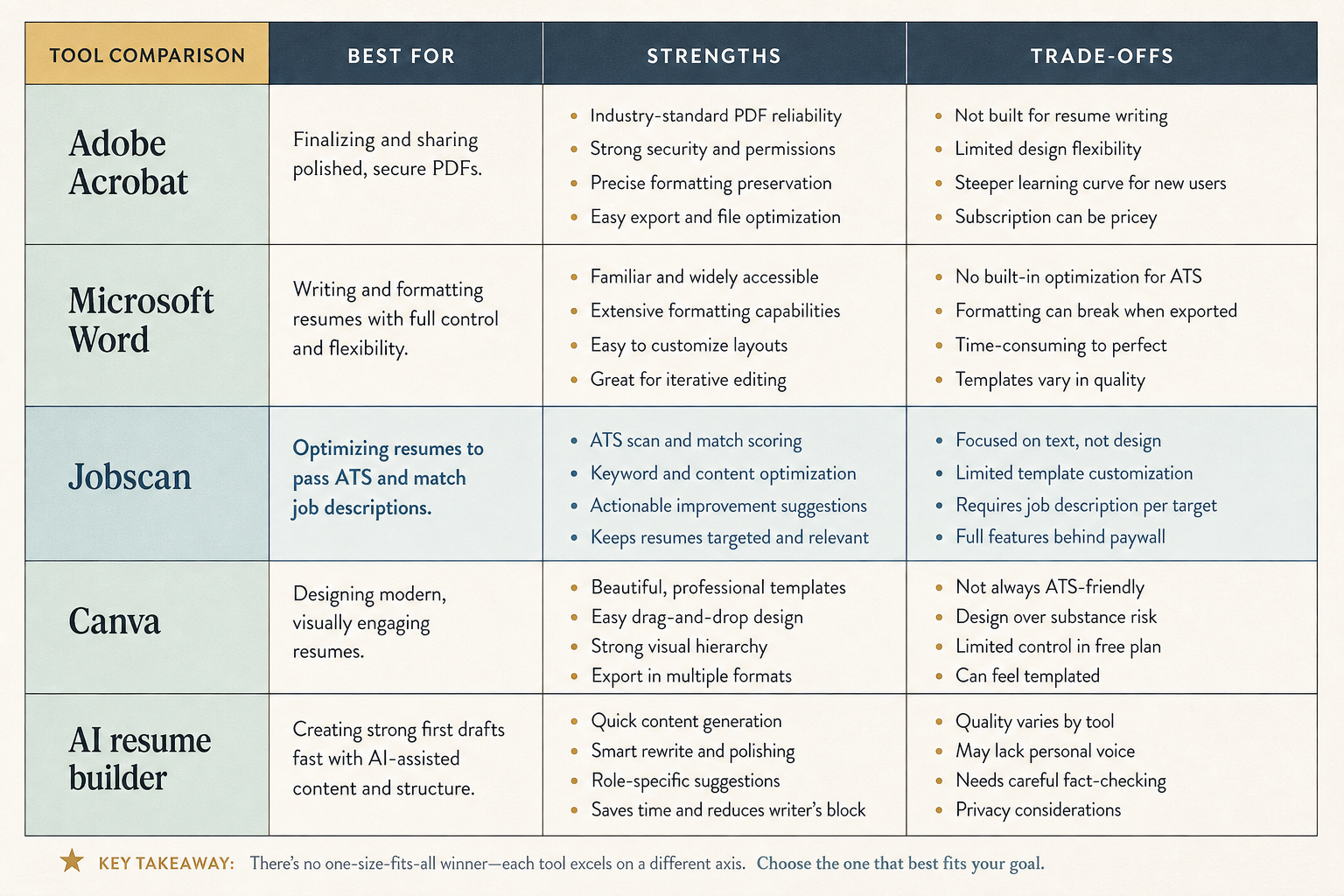
Each tool wins on a different axis, so the right choice depends on your goal.
What is considered the best resume?
The best resume is usually a tailored reverse chronological resume that makes recent experience easy to scan. That format gives recruiters a fast path from current role to past roles, and it gives ATS software a structure it can parse without guessing. A strong builder should make that format effortless, not force the user to invent the structure from scratch.
A good benchmark is the Harvard resume style, which favors clarity, tight phrasing, and readable hierarchy over decorative layout. That does not mean every resume should look the same. It means the best output is easy to skim, concrete about outcomes, and organized around relevance rather than ornament.
The content matters more than the visuals. A builder can offer elegant templates, but if the bullets are vague or the dates are inconsistent, the resume still fails. The strongest tools push users toward specific achievements, role matching, and a clean heading structure.
What is the best resume format right now?
The best resume format right now is reverse chronological for most job seekers. It is the easiest format for recruiters to follow and the safest default for ATS compatibility. That is why so many builders lead with it, even when they also offer functional or combination layouts.
A reverse chronological resume puts the most recent experience first, which helps hiring managers see current scope quickly. It also avoids the common problem of over-designed sections that look good on screen but break when parsed. If you want a deeper explanation of why that matters, see our guide to ATS-friendly formatting.
Other formats still have a place. Career changers sometimes use combination layouts to shift attention toward relevant skills, and first-job seekers may need a simpler structure that spotlights education and projects. But for mainstream applications, the format choice should be boring on purpose. The best resume builder website makes the safe choice easy.
Best resume builder websites compared
The best builder for you depends on whether you want control, guidance, visual polish, or automation. Adobe Acrobat, Microsoft Word, Jobscan, Canva resume builder, and AI resume builder options each solve a different part of the problem, and none of them wins every category.
| Tool | Best for | Strengths | Trade-offs |
|---|---|---|---|
| Adobe Acrobat | PDF cleanup and final review | Strong PDF handling, familiar workflow | Not purpose-built for resume writing |
| Microsoft Word | Manual control | Easy to edit, common format, flexible templates | Formatting can drift, and users must manage structure themselves |
| Jobscan | ATS matching | Keyword comparison and job-match guidance | Not a full resume-building experience on its own |
| Canva resume builder | Visual templates | Attractive layouts, simple drag-and-drop design | Style can outrun ATS safety if users overdesign |
| AI resume builder | Draft speed | Fast first drafts, bullet suggestions, role targeting | Needs human editing to avoid generic output |
Adobe Acrobat is best when the resume already exists and the job seeker needs to inspect or refine the PDF output. Microsoft Word is best for people who want full manual control and already know how to format a document. Jobscan is best as a companion tool, not as the main writer, because its value is in keyword alignment and gap detection.
Canva resume builder is a strong option for users who want visual polish quickly. It can be useful for creative roles, but the user still needs to check whether the chosen template stays readable after export. We cover that trade-off in more detail in our look at Canva and ATS fit.
AI resume builder tools are the newest category and the most tempting for busy applicants. They can save time on first drafts, but the output still needs review for specificity, tone, and accuracy. The best AI-assisted flow is one that speeds up writing without flattening the resume into generic claims. For that reason, a free AI resume builder can be useful, but only if the user stays in control of the final text.
If the reader is asking what is the best resume builder website for practical use, the answer is usually a purpose-built resume builder over a general document app. Microsoft Word and Adobe Acrobat are excellent tools, but they are not the same thing as a guided resume workflow. That distinction is where many job seekers lose time.
Best free resume builder options
The best free resume builder is the one that lets a user finish, download, and edit a real resume without pushing the paywall too early. A free builder that looks generous but blocks export at the end is not actually helping the job seeker. It is just delaying the problem.
A good free builder should do four things well.
- Let the user create a complete resume with no watermark on the final file.
- Allow at least one clean download, usually PDF.
- Keep editing open long enough to fix the draft.
- Make the free experience understandable before the user commits time.
That is why free plan reviews need to focus on the finish line, not just the template gallery. Readers should compare whether the site lets them export a usable file, how much branding appears, and whether the tool keeps the core resume editable after download. Our guides on free builder criteria and free download options walk through those trade-offs in more detail.
A free builder is enough for straightforward applications, internships, and early job searches. It becomes less enough when the user needs multiple versions, stronger customization, or ongoing revision speed. That is also where paid tiers start to make sense, which is why a clear pricing comparison matters before anyone picks a tool.
What is a good resume builder?
A good resume builder is fast, flexible, and honest about what it can export. It should help the user write a resume that looks clean on screen and still reads correctly in ATS software. If it only produces pretty screenshots, it is solving the wrong problem.
The minimum checklist is straightforward.
- Editable sections for summary, experience, education, and skills.
- Simple controls for order, spacing, and formatting.
- Clean PDF export, and ideally DOC export too.
- Guidance that helps users write role-specific bullets.
- A mobile-friendly workflow for people using a resume builder app.
This is where general tools often fall short. A document editor can be flexible, but it does not always guide the user toward a better resume structure. A purpose-built builder should reduce decision fatigue, not add to it. That is especially true for people who are starting from scratch and need the tool to supply the shape as well as the surface.
What is a good free resume builder?
A good free resume builder is one that delivers a usable result before the payment prompt appears. The user should be able to write, review, and export a resume without needing to guess where the limits are. If the free plan is too narrow, it becomes a preview, not a builder.
The best free tools usually make a few compromises. They may limit template variety, cap export formats, or show upgrade prompts. That is fine if the resume can still be completed cleanly. It is not fine if the free version stops the user halfway through editing or hides the final file behind a hard paywall.
If you want a simple rule, use this one: free is good when it saves time, not when it creates extra steps. The user should leave with a file they can send, not a project they still need to finish elsewhere.
Which type of resume is most effective?
The most effective resume type for most applicants is the reverse chronological resume. It shows current experience first, makes career progression easy to understand, and usually fits ATS systems better than more decorative alternatives. That is why most strong builders still optimize around it.
A combination resume can help when someone needs to foreground transferable skills, especially after a career change. A functional resume is rarer, because it can hide timeline clarity and raise questions for recruiters. Those formats are not wrong, but they are harder to use well, and the wrong builder can make them look forced.
For first-job seekers, the question is usually not which format is the most creative. It is which format makes education, projects, internships, or volunteer work legible without clutter. The best resume builder website should help the user choose the structure that fits the story, then keep the layout clean enough that the story is easy to read.
What are red flags on resumes?
The biggest red flags on resumes are mistakes that make the document look careless or hard to parse. Inconsistent dates, vague bullets, mismatched formatting, and crowded layouts all weaken trust fast. The best builder helps prevent those errors before they reach a recruiter.
A few patterns show up again and again.
- Dates that do not line up across roles.
- Bullets that describe duties but not outcomes.
- Decorative elements that distract from the content.
- Keyword stuffing that reads like copying and pasting the job description.
- PDFs that look fine on the editor screen but break in export.
This is where builder quality matters more than design taste. A good site catches structure problems early, keeps spacing stable, and nudges the user toward cleaner writing. A bad site makes the resume look modern while hiding the mistakes that actually cost interviews.
What is the best resume builder?
The best resume builder is the one that fits the user’s path: Word for manual control, Acrobat for PDF handling, Jobscan for ATS matching, Canva for visual speed, and a dedicated resume builder for the fastest clean draft. If the goal is to get from blank page to a complete resume with minimal friction, a purpose-built builder is usually the strongest choice.
That is the practical answer to what is the best resume builder website. The site should help the user produce a reverse chronological resume, export it cleanly, and avoid unnecessary format risk. Anything less is a partial tool, not the best one.
What is the best free resume builder?
The best free resume builder is the one that lets the user finish and download the resume without surprise limits. It should be clear, editable, and good enough to send for real applications. If the free plan blocks export or makes the file look branded, it falls short of the basic job.
For readers comparing free tools, the decision comes down to three questions: Can the resume be completed? Can it be downloaded cleanly? Does the free tier still leave the user in control of the final file? If the answer is yes to all three, the builder is worth serious consideration.
FAQ
What is the best resume builder?
The best resume builder is the one that matches the user’s needs: manual control in Word, PDF cleanup in Acrobat, ATS matching in Jobscan, visual speed in Canva, or a purpose-built builder for the fastest complete draft. The right choice depends on whether the user values speed, control, or guidance most.
What is the best free resume builder?
The best free resume builder is the one that lets the user complete and download a real resume without hidden limits. A usable free plan should allow editing, export, and a clean final file before any payment request appears.


Create your Resume
Your resume is an extension of you. Make it truly yours.
Related Articles
Resume Maker vs Resume Builder: Which Should Job Seekers Use?
Pick the right tool in minutes. See when a resume maker wins on speed, when a builder helps more, and how ATS, format, and downloads change it.
Free Resume Builder and Download vs Microsoft Word
See which tool gets you a polished resume faster, with cleaner formatting and easier exports. Compare free resume builder and download options now.
How to Cancel Resume Builder Subscription Without Surprises
Stop surprise renewals in minutes. Learn how to cancel resume builder subscription in account settings, billing portals, or support flows—save proof.
Continue Reading
Check more recommended readings to get the job of your dreams.
careerBy Pika Resume Team | Aug 3, 2026
Resume Maker vs Resume Builder: Which Should Job Seekers Use?
By Pika Resume Team | Aug 3, 2026
careerBy Pika Resume Team | Aug 2, 2026
Free Resume Builder and Download vs Microsoft Word
By Pika Resume Team | Aug 2, 2026
careerBy Pika Resume Team | Jul 30, 2026
What Is the Best Resume Builder Website for 2026?
By Pika Resume Team | Jul 30, 2026
careerBy Pika Resume Team | Jul 27, 2026
How to Cancel Resume Builder Subscription Without Surprises
By Pika Resume Team | Jul 27, 2026
careerBy Pika Resume Team | Jul 26, 2026
How Much Is Resume Builder? Free vs Paid Explained
By Pika Resume Team | Jul 26, 2026
careerBy Pika Resume Team | Jul 20, 2026
Resume Builder App: What the Best One Lets You Do
By Pika Resume Team | Jul 20, 2026
careerBy Pika Resume Team | Jul 19, 2026
Free Resume Builder and Download: Compare the Best Options
By Pika Resume Team | Jul 19, 2026
careerBy Pika Resume Team | Jul 16, 2026
Free AI Resume Builder: What It Does Well and Fails At
By Pika Resume Team | Jul 16, 2026
careerBy Pika Resume Team | Jul 13, 2026
Resume format for ATS: a simple guide that works
By Pika Resume Team | Jul 13, 2026
careerBy Pika Resume Team | Jul 12, 2026
Canva Resume Builder vs ATS Reality Check
By Pika Resume Team | Jul 12, 2026
careerBy Pika Resume Team | Jul 9, 2026
Free resume builder: what makes one worth using
By Pika Resume Team | Jul 9, 2026
careerBy Pika Resume Team | Jul 6, 2026
Resume Builder: What It Actually Does for Job Seekers
By Pika Resume Team | Jul 6, 2026
resume tipsBy Pika Resume Team | Jun 20, 2026
The Resume Sections Most People Get Wrong (and How to Fix Each One)
By Pika Resume Team | Jun 20, 2026resume tipsBy Pika Resume Team | Jun 18, 2026
How to Edit a PDF Resume Without Wrecking the Formatting
By Pika Resume Team | Jun 18, 2026resume reviewBy Pika Resume Team | Jun 16, 2026
AI Resume Feedback vs a Human Expert Review: When Each Is Worth It
By Pika Resume Team | Jun 16, 2026atsBy Pika Resume Team | Jun 14, 2026
What an ATS Actually Does to Your Resume (and the 8 Things It Scores)
By Pika Resume Team | Jun 14, 2026resume tipsBy Pika Resume Team | Jun 12, 2026
How to Tailor Your Resume to a Job Description in 2026 (the 3-Pass Method)
By Pika Resume Team | Jun 12, 2026resumeBy Gargi Chaudhari | May 30, 2026
Resume vs Biodata vs CV: Which One Do You Actually Need?
By Gargi Chaudhari | May 30, 2026resume By Astha Narang | May 28, 2026
10 Software Engineer Resume Examples That Got Interviews (2026)
By Astha Narang | May 28, 2026resumeBy Gargi Chaudhari | May 26, 2026
How to Convert a LinkedIn Profile to a Resume or CV
By Gargi Chaudhari | May 26, 2026resumeBy Astha Narang | May 23, 2026
Best Resume Format for Indian IT Services Companies (TCS, Infosys, Wipro, Accenture)
By Astha Narang | May 23, 2026resumeBy Gargi Chaudhari | May 21, 2026
The Complete Guide to ATS Resume Screening in India (2026)
By Gargi Chaudhari | May 21, 2026resumeBy Astha Narang | May 19, 2026
Hobbies and Interests for Resume: Should You Include Them?
By Astha Narang | May 19, 2026resumeBy Gargi Chaudhari | May 14, 2026
How to Write a Resume Headline That Gets Recruiter Calls on Naukri
By Gargi Chaudhari | May 14, 2026resumeBy Astha Narang | May 12, 2026
Skills to Put on Your Resume in 2026 (India Edition)
By Astha Narang | May 12, 2026interviewBy Astha Narang | May 8, 2026
Decoding Interviewer Psychology: What They Don't Tell You for Your Next Job
By Astha Narang | May 8, 2026resumeBy Gargi Chaudhari | May 7, 2026
Career Objective for Resume: 50+ Fresher Examples (2026)
By Gargi Chaudhari | May 7, 2026resumeBy Astha Narang | May 6, 2026
7 Dangerous ATS Myths Debunked: What Actually Gets You Hired in 2026
By Astha Narang | May 6, 2026resumeBy Astha Narang | May 5, 2026
How to Write a Resume Format for Freshers in India (2026 Guide)
By Astha Narang | May 5, 2026resumeBy Astha Narang | May 4, 2026
Master Your Resume: The Ultimate Guide to Listing Computer Skills
By Astha Narang | May 4, 2026resumeBy Astha Narang | May 2, 2026
Resume Objective Examples: Craft a Compelling Intro for Any Career Level
By Astha Narang | May 2, 2026resumeBy Astha Narang | Apr 29, 2026
4 Sales Resume Examples for SDR, Account Executive & Manager (2026)
By Astha Narang | Apr 29, 2026resumeBy Astha Narang | Apr 29, 2026
4 Data Analyst Resume Examples for 2026 (Entry-Level to Senior)
By Astha Narang | Apr 29, 2026resumeBy Astha Narang | Apr 27, 2026
Resume Skills for 2026: What Actually Matters and What to Cut
By Astha Narang | Apr 27, 2026resumeBy Astha Narang | Apr 24, 2026
Resume Tips for 2026: The Ultimate Guide to Landing Interviews
By Astha Narang | Apr 24, 2026resumeBy Astha Narang | Apr 22, 2026
Bad Resume vs. Good Resume: A Side-by-Side Comparison for Job Seekers
By Astha Narang | Apr 22, 2026resumeBy Astha Narang | Apr 20, 2026
How to Add LinkedIn to Your Resume the Right Way in 2026
By Astha Narang | Apr 20, 2026resumeBy Astha Narang | Apr 17, 2026
7 Common Resume Mistakes to Avoid in 2026 (and How to Fix Them)
By Astha Narang | Apr 17, 2026resumeBy Pika Resume Team | Apr 15, 2026
Master Your LinkedIn-to-Resume Link: A 2026 Guide for Top Candidates
By Pika Resume Team | Apr 15, 2026resumeBy Astha Narang | Apr 13, 2026
How to Write a Winning Resume Summary That Grabs Recruiter Attention
By Astha Narang | Apr 13, 2026careerBy Astha Narang | Apr 11, 2026
Owning Your Career Break: How to Frame a Gap Year on Your Resume in 2026
By Astha Narang | Apr 11, 2026resumeBy Astha Narang | Apr 8, 2026
The Complete 2026 Resume Guide: Crafting a Job-Winning Document
By Astha Narang | Apr 8, 2026resumeBy Astha Narang | Apr 4, 2026
Beat the ATS: Optimize Your Resume for Applicant Tracking Systems in 2026
By Astha Narang | Apr 4, 2026resumeBy Astha Narang | Mar 30, 2026
Expert Resume Review: Is It Worth the Investment for Your Career?
By Astha Narang | Mar 30, 2026resumeBy Astha Narang | Mar 27, 2026
How Many References Should You Have on Your Resume?
By Astha Narang | Mar 27, 2026resumeBy Astha Narang | Mar 25, 2026
Master the 30-Second Resume Scan: Expert & Recruiter Insights
By Astha Narang | Mar 25, 2026resumeBy Astha Narang | Mar 24, 2026
How to Explain Employment Gaps on Your Resume & Ace Interviews
By Astha Narang | Mar 24, 2026resumeBy Astha Narang | Mar 20, 2026
Master Resume Keywords: Your Guide to ATS Success
By Astha Narang | Mar 20, 2026careerBy Astha Narang | Mar 18, 2026
How to Stand Out in Interviews While Still Being Authentic
By Astha Narang | Mar 18, 2026careerBy Astha Narang | Mar 14, 2026
Why Sending the Same Resume to Every Job is Costing You Interviews
By Astha Narang | Mar 14, 2026resumeBy Astha Narang | Mar 12, 2026
The Dynamic Duo: Why AI + Human Expertise is the 2026 Career Cheat Code
By Astha Narang | Mar 12, 2026careerBy Astha Narang | Mar 9, 2026
Get Your Resume Roasted Using PIKA AI
By Astha Narang | Mar 9, 2026jobBy Astha Narang | Mar 7, 2026
How to Show a Promotion on Your Resume? (And Why Most People Get It Wrong)
By Astha Narang | Mar 7, 2026careerBy Astha Narang | Mar 6, 2026
Should You Put Your Address on Your Resume in 2026?
By Astha Narang | Mar 6, 2026careerBy Astha Narang | Mar 3, 2026
Is It Illegal to Lie on a Resume? What Actually Happens in 2026
By Astha Narang | Mar 3, 2026jobBy Pika Resume Team | Feb 5, 2026
How to Optimize Your Resume for Remote Job Applications
By Pika Resume Team | Feb 5, 2026interviewBy Pika Resume Team | Feb 1, 2026
How to Write an ATS-Friendly Resume in 2026
By Pika Resume Team | Feb 1, 2026cover-letterBy Pika Resume Team | Jan 25, 2026
Top 7 Cover Letter Mistakes That Cost You the Interview
By Pika Resume Team | Jan 25, 2026resumeBy Pika Resume Team | Jan 18, 2026
AI Resume Builders: A Complete Guide for Job Seekers in 2026
By Pika Resume Team | Jan 18, 2026jobBy Pika Resume Team | Jan 10, 2026
Resume Tips for Career Changers: Making a Smooth Transition
By Pika Resume Team | Jan 10, 2026careerBy Pika Resume Team | Jan 3, 2026
The Power of Keywords in Your Resume: An SEO Approach to Job Applications
By Pika Resume Team | Jan 3, 2026